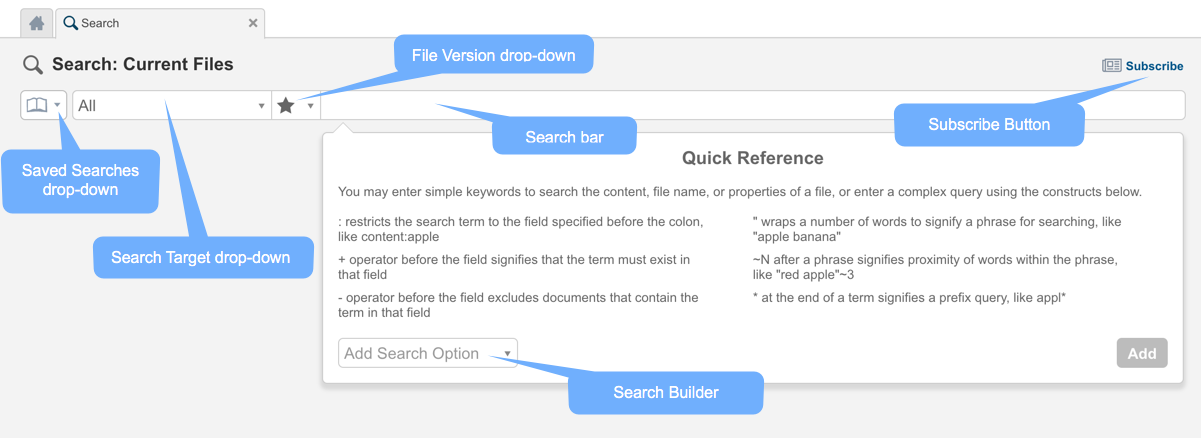
The Search tab enables you to search the most recent version of all files, in the most recent DiscoveryPoint, for any selected target.
Figure: Search tab components
When using the Search tab, keep the following in mind:
 Tab Information
| Content | Description |
|---|---|
| Saved Searches menu | Drop-down menu providing a way of saving searches, a list of any previously saved private or public searches, and a search bar with which you can search for any saved searches. For more information, see Saved Searches. |
| Search Target drop-down menu | Drop-down menu that enables you to choose the VM on which you want to perform a search. |
| File Version drop-down menu | Drop-down menu that enables you to choose current files (the default), deleted files, or all file versions. |
| Search bar | Field that enables you to specify various search criteria. The search bar supports content, tag, user, file path, file property, fingerprint, and date searches. |
| Faceted Search Panel | Panel containing list-specific filter items. Enables you to modify the output by selecting or deselecting different filter options. For more information, see Filtering Search Results. |
| View Selection List |
List of different views that you can use to extract information for the current search results. The other views include:
|
For more information about the Search tab and different search functions, see the following topics:
|
2.2 |
Copyright © 2018 HyTrust, Inc. All Rights Reserved. |
Follow us: |

