Configuring the Oracle Server Cryptographic Library
This section explains how to configure the cryptographic library on Oracle Server.
-
Navigate to the KeyControl Vault database connector (configured here Configuring KeyControl Vault for Oracle TDE).
-
Select the database connector and from the Action menu, select Generate Access Token.
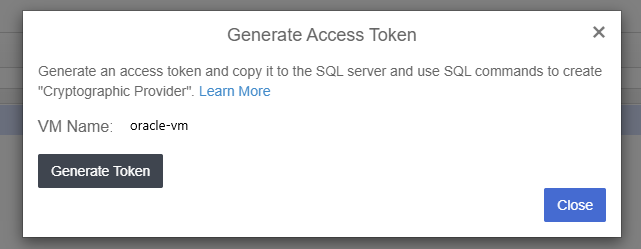
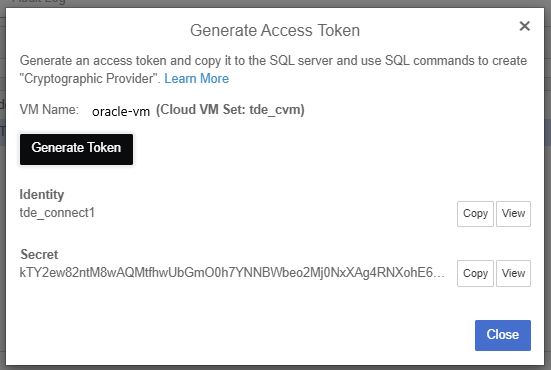
-
Copy the access token to the Oracle Server and create the Cryptographic Config file.
-
Create a config file using the copied Access Token (Identity and Secret) in your Oracle Server that will be used by the database administrators. Note that it is in json format:
Copy# cat /opt/oracle/entrust/orcl.conf
{
"identity" : "tde_connect1",
"secret" : "S3XsZJe/EPNVf2D/YufOUS2HuOsLfKJBKjp3Zx/JIrODqWYRQaYiFWnqet4lPsW0VcvGSvH7yB9BUZIxGi7CaM68cZFtw6yY5IvaClwD3344MFy28U9zjc0ayFRoHQi/Dv25xTZ8a2JLlxJRyavO2VNGaCPUZfFsPN4lZg3EZwJ3fNKa7Owfpk0AuHmWmcqcYsxNnUxPuc+VYqXZk17omHzYP/sA86RCv6+825t0EvuQhDHF7PxSiHjn+VShCYKNb+RxAvLglIP/eVx0k/HWWI6/bZPpxwjFtw3tqnJ/8toqPD+f+ZUlYT0mFRuE7BExGFf5LBCaVwf5FXKcOeXdaAg8zvaq0ynUjSB9JVw5FP6ZtFrY22hUcFcYDPITpjMzUzsX9d5BM8BhyTLmoPkj4lMyrSh3/nwGlJqPLj92EylmKsSOtOP6irpN22A2omvTsXUP/pajuGrtUsKqzDdhAj+qmR2IDkSdOQMoSSvAgWylAuS6q8WdMvm8SVCVUZpQrLvm226NvfvGCHKKNZaQCdxvL4XIgKI/tCt+F+Xx0Pk/bkPgLby90IM5NtktRkroxakhGkgSnoyDj2KovGvIwrHLpFpvDJkCwxbBce+OpcOjxR2tZ3nDM2zoZraSviT0P+V2hh7Z0jAWd4YrRdooxtQc3VPjTOrdOBldCExetFk="
}
