Entrust Policy Agent GUI Overview
The Entrust Policy Agent GUI is installed locally on the Windows server with the Entrust Policy Agent. It provides basic encryption, decryption, and rekeying functionality by sending requests to Cryptographic Security Platform Vault for VM Encryption so that you do not need to log into the Cryptographic Security Platform Vault for VM Encryption webGUI.
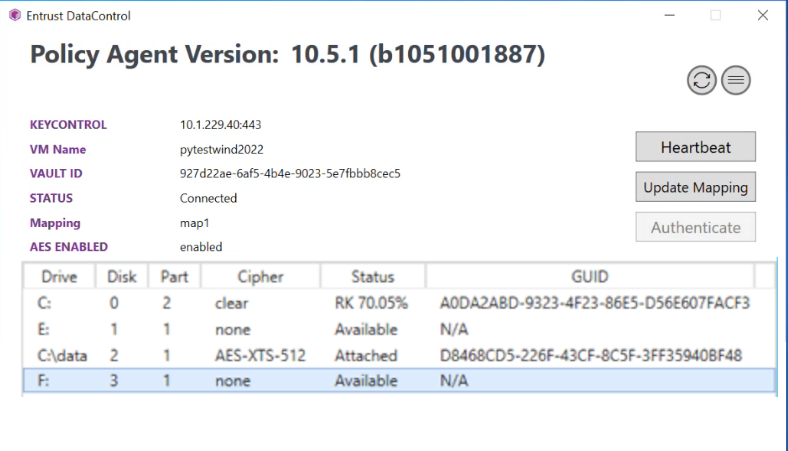
Figure: Example of the Entrust Policy Agent GUI Interface
The Entrust Policy Agent GUI allows you to register or authenticate the VM with Cryptographic Security Platform Vault for VM Encryption, and it displays the following information:
-
the connection information.
-
the status of each disk or folder mount on the VM.
In the Policy Agent,you can click the Heartbeat button to manually force a heartbeat connection, click the Update Mapping button to use the mapping that you created in the Cryptographic Security Platform Vault for VM Encryption webGUI, or right-click any of the listed disks or folder mounts to encrypt or decrypt them. In the screenshot above, the GUI shows that the folder mount C:\data is encrypted and attached to the Cryptographic Security Platform Vault for VM Encryption while C: is being encrypted and the encryption process has completed 70.05% of the disk.
If you had not yet registered the Policy Agent, then the screen would show a Register button that you can click to register it.
For details,