Windows Encryption Management with the Entrust Policy Agent GUI
Windows disks can be encrypted or decrypted using the Cryptographic Security Platform Vault for VM Encryption webGUI, hicli, or the Entrust Policy Agent GUI that is installed locally on the Windows server with the Entrust Policy Agent. The Entrust Policy Agent GUI provides basic encryption and decryption functionality without requiring the use of the Cryptographic Security Platform Vault webGUI. The GUI looks similar to the following:
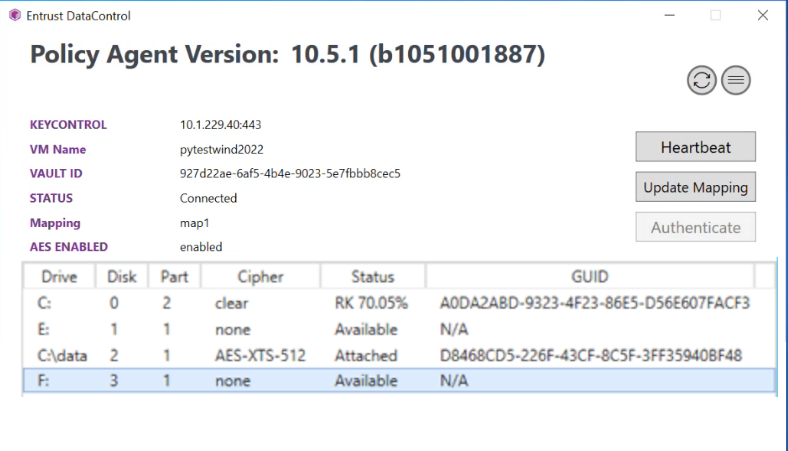
The GUI shows the Cryptographic Security Platform Vault connection information and the status of the VM with Cryptographic Security Platform Vault. The VM status can be one of the following:
- Not registered — The Policy Agent software is installed but the VM has not yet been registered with Cryptographic Security Platform Vault.
- Connected — The VM can communicate with the Cryptographic Security Platform Vault for VM Encryption and everything is running normally.
- Could not connect — The Cryptographic Security Platform Vault for VM Encryption is not reachable. If this condition continues, the VM will need to be re-authenticated with the Cryptographic Security Platform Vault for VM Encryption when communication is re-established.
- Need to update certificate — The certificate for the is VM is no longer valid and should be updated.
- Reauth needed — The VM needs to be re-authenticated.
- Virtual Machine not authenticated — VM permissions have been revoked from the Cryptographic Security Platform Vault for VM Encryption. To fix this issue, see Reactivating a Revoked Disk.
- Identity verification failed — Permissions are not available because the VM heartbeat has timed out or its IP address or hardware signature has changed. This can occur if you have changed the IP address on a VM or copied the VM to a new server.
- Unknown error from KeyControl cluster — An unknown error has occurred. Please contact support if you see this message.
The table beneath the status area shows the disks on the VM and their encryption status. In the screenshot above, C: is in the process of encrypting and the folder mount C:\data has been encrypted, but disks E: and F: are not encrypted.