Click the Insights button at the top to display a statistics dashboard that slides down above the configurations.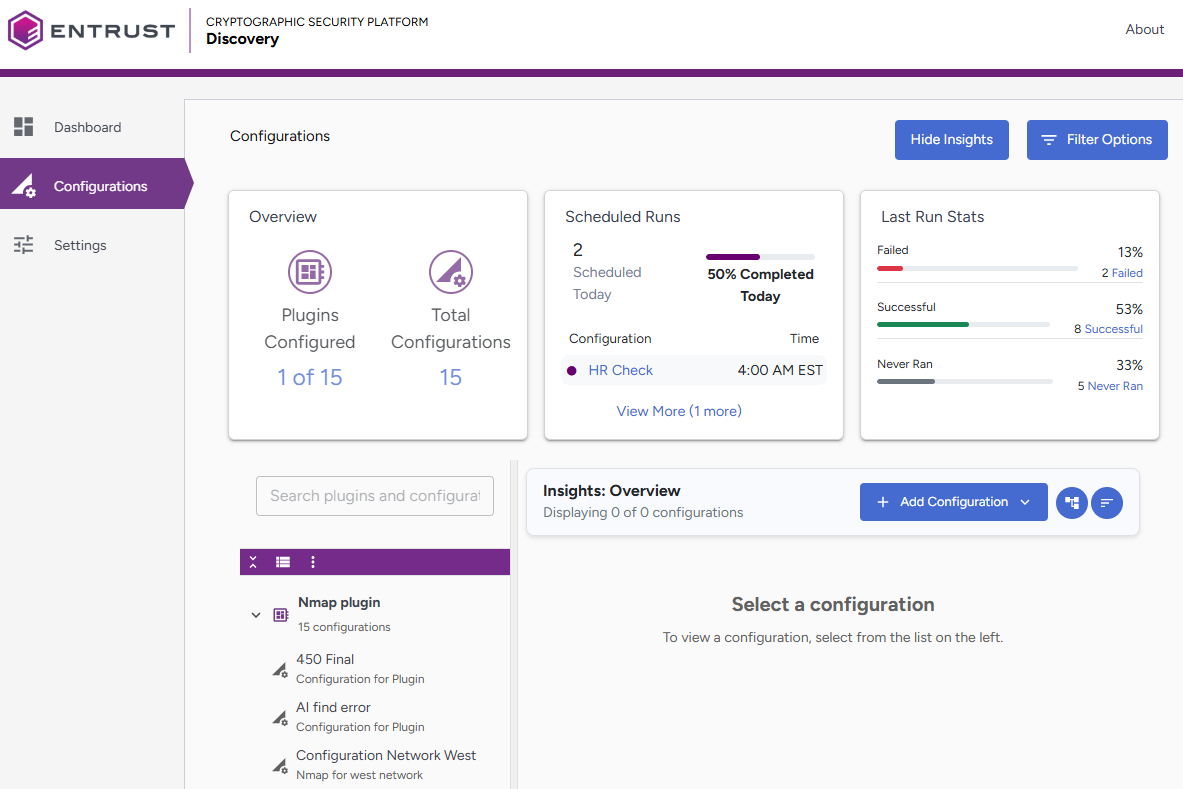
The following widgets are available:
- Overview—The Overview widget displays two key metrics:
- Plugins Configured: Displays the number of available plugins that have at least one configuration. For example, 1 of 15.
- Total Configurations: Displays the total number of individual configurations that have been set up. For example, 15.
When you select a plugin tree, the plugin tree will change accordingly.
- Scheduled Runs—This widget displays the upcoming scheduled runs for today. It displays the configuration names along with their scheduled run times.
Clicking a configuration name filters the plugin tree, allowing you to view more configuration information in the content panel.
- Last Run Stats—This widget displays execution results from recent runs in the following categories:
- Failed: Configurations that encountered errors during execution.
- Successful: Configurations that completed without errors.
- Never Ran: Configurations that have not been executed yet.
Click any category to filter the plugin tree and display only those configurations.