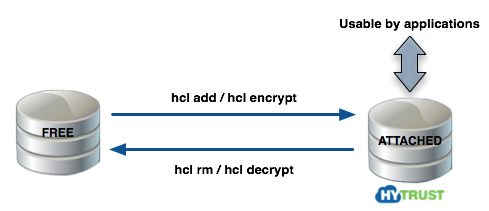
In Linux, a disk can either be free or it can be under HyTrust control. If HyTrust controls it, then it must be attached before applications can access it.
HyTrust allows you to register:
hcl add command).hcl encrypt command).After you register a disk with KeyControl and perform the initial encryption, you can rekey the disk, move the disk, or reimport the disk using the webGUI or hicli.
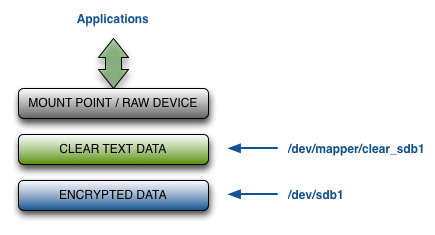
KeyControl creates an unencrypted path to the data that is accessible when the disk is attached. The default pathname is /dev/mapper/clear_diskname (for example: /dev/mapper/clear_sdb1), but you can change that path when you register the disk.
| Warning: | Once the encrypted disk has been set up you should NOT access the unencrypted device through anything other than the clear text path. In other words, you always need to use /dev/mapper/clear_sdb1 instead of /dev/sdb1. The Linux kernel caches data in the kernel which may be periodically flushed. If you write to the raw device without going through the /dev/mapper interface, you could end up with corrupted data. |
The following figure summarizes the layers at which encrypted and unencrypted data is available: