Linux Directory-Level Encryption with FSIDs
The Policy Agent allows you to encrypt Linux directories and share encryption keys across NFS clients. The following figure shows where the encryption is taking place:
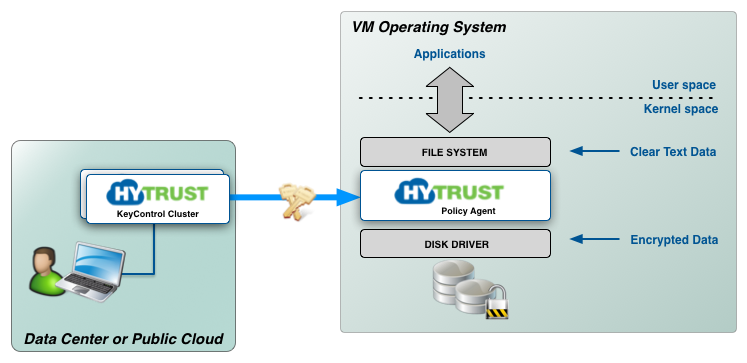
The HyTrust filesystem filter driver, based on the Linux eCryptfs filesystem, runs across all versions of Linux and sits just above the base filesystem. Thus any type of filesystem is supported (both local, NFS and SAMBA). There are no limits to the number of folders that can be encrypted per VM and encryption / decryption is transparent to all applications that are running over the encrypted folder. We encrypt not just the contents of the files but also the filenames.
The encryption is accomplished using FSIDs (filesystem IDs), which reference AES encryption keys. Unlike disk encryption where no key is specified, we need a reference to a key because we need to be able to refer to the key from multiple NFS clients.
Restrictions
- Directory-level encryption is not supported in RHEL 7.x or CentOS 7.x because these versions of Linux do not support eCryptfs. NFS is not supported on RHEL 6.x and above or CentOS 6.x or above.
- You cannot encrypt all directories in a Linux VM. The HyTrust DataControl Policy Agent starts up once all major services are available (networking etc). Be careful not to choose system directories for which clear-text files need to be available during bootstrap.
The easiest way to understand how to use HyTrust file/folder encryption is that the specified directory must be empty prior to calling “
hcl addfs”. - FSIDs are for Linux systems only. They are not supported on any version of Windows.
|
Follow us: |

