Entrust KeyControl System Console Overview
When you log into the KeyControl VM console as htadmin
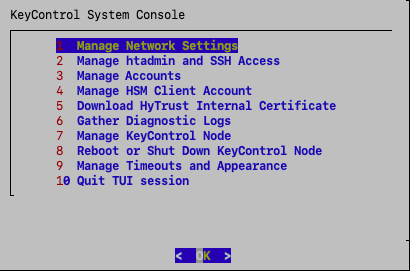
Figure: Example of the Entrust KeyControl System Console Main Page
The menu is a TUI (Text-based User Interface). You navigate through the TUI using the Tab key to move between fields and pressing Enter when the correct choice is highlighted. If the TUI screen has numbers at the start of the line, you can also press the corresponding number key and then press Enter to navigate through the menus.
In the screenshot above, pressing Enter goes to the Network Configuration screen of the TUI.
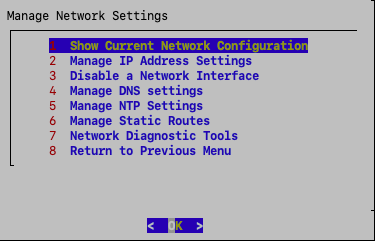
Figure: Example of the Entrust KeyControl System Console Network Configuration Page
To return to the main Entrust KeyControl System Console screen, press Esc (Escape). Based on where you are in the menus, you may need to press Esc several times.
For more information, see Using the Entrust KeyControl System Console.
